




A children’s book illustration already does a lot of storytelling on its own — the wide-eyed expression, the exaggerated pose, the colors that feel like they belong in a dream. But turning a page only ever reveals the next still moment, never the motion in between.
With image to video technology, that in-between motion can finally exist. A single storybook illustration can become a short animated scene that brings a character’s world to life in a way a printed page never could.

Dreamina, powered by its latest and most advanced video generation model, Seedance 2.5, gives authors and illustrators a simple way to let their stories move.
Why children’s stories are especially suited to motion
Children’s books rely heavily on visual storytelling, often more than text, to hold a young reader’s attention. A character’s expression, a magical creature’s glow, a forest’s gentle sway all do quiet narrative work on the page. Animation doesn’t change that storytelling instinct — it simply lets those details finish the sentence they were always starting.
What animated illustrations add to a children’s story
Bringing a storybook page to motion adds a few things that stay locked inside a still illustration:
- A sense of wonder, as magical elements shimmer or glow rather than sit static
- Gentle character motion, like blinking or walking, that makes characters feel alive
- A softer, more immersive way for young readers to connect with a scene
Inside Seedance 2.5: preserving a storybook’s charm
Style-aware creativity transfer
Children’s illustration often has a distinct, softened art style, and Seedance 2.5’s creativity transfer capability helps it pick up on that visual tone, so a page still feels like part of the same storybook once it starts moving, rather than shifting into a different aesthetic entirely.
Longer scenes for fuller storytelling moments
Native clips now support up to 30 seconds, with the “Ultra-long Video Generation (beta)” mode extending that range up to 180 seconds — enough time to let a scene unfold gently, matching the slower pace many children’s stories are read at.
Handling character consistency across a story
For books following the same character across multiple pages, Seedance 2.5 addresses the “twin” duplication issue, helping a character stay visually consistent from one animated scene to the next.
Precise local editing
Local editing allows small details — a stray mark, an element that doesn’t read well in motion — to be adjusted within a frame without regenerating the entire illustration’s animation.
Animating your storybook page with Dreamina
Step 1: Upload your illustration and describe the scene’s motion
Sign in to Dreamina and open the “AI Video” section. Click “Add reference image” to upload your children’s book illustration, then write a prompt describing the gentle motion you want.
For a 30-second clip, try: Using the bear character and forest from the reference image, generate a 30-second animated video: the bear slowly walking forward along the path, leaves and fireflies gently drifting through the air, soft magical light glowing between the trees, camera slowly following alongside the bear as it continues deeper into the forest.
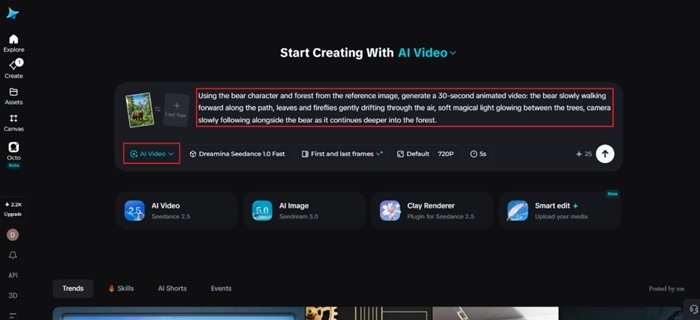
Step 2: Generate the scene with Seedance 2.5
Select the Seedance 2.5 model, choose your video length, then pick an aspect ratio suited to how you’ll share it — 16:9 for a read-along video or YouTube, 9:16 for social platforms or a mobile storybook app. Click Dreamina’s generate icon and let the page come to life.
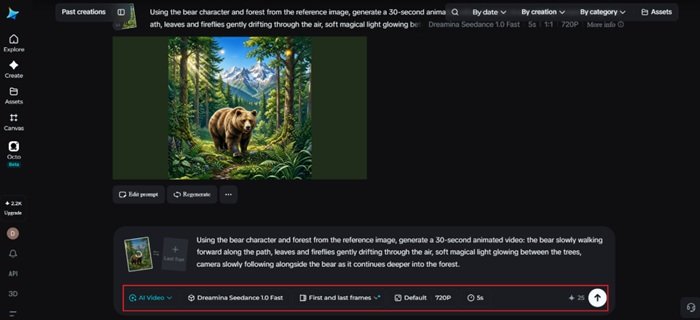
Step 3: Refine and share your animated storybook scene
Use Dreamina’s editing tools to finish the clip — Upscale for cleaner detail across soft illustration textures, Generate soundtrack for gentle, whimsical background music — then export and share it as part of a read-along video or promotional content for your book.
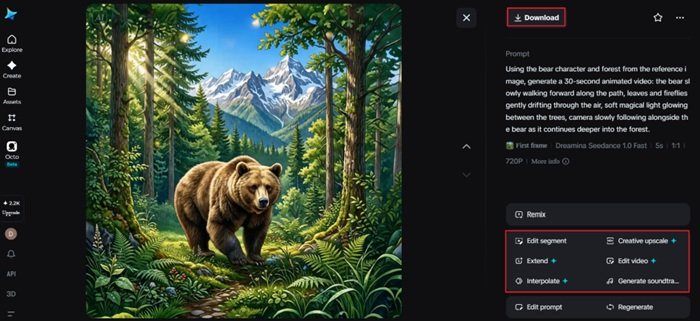
Keeping the motion gentle and age-appropriate
Children’s content calls for a different kind of restraint than other creative work. Soft, slow movement — a character blinking, walking, or reacting calmly — tends to suit the tone of most storybooks far better than fast or dramatic motion, which can feel jarring against gentle illustration styles built for young readers.
Choosing which pages deserve animation
Not every page in a book needs to move. The strongest candidates are usually pivotal story moments — a character’s first appearance, a magical reveal, an emotional turning point — rather than transitional pages that mostly move the plot along without a strong visual centerpiece.
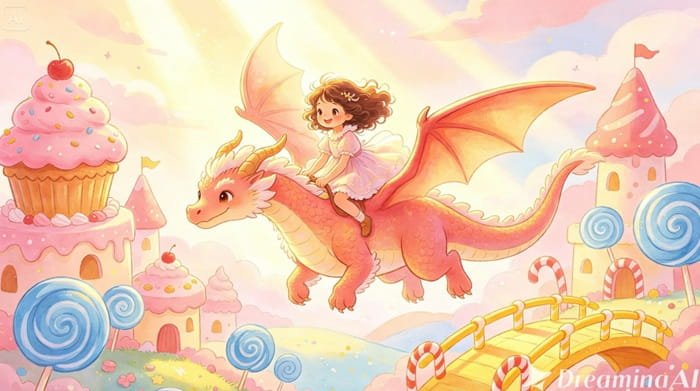
Using animated pages to support the reading experience
Animated illustrations work especially well as companions to the printed book rather than replacements for it. A short animated clip shared alongside a book’s release, or used in a read-along video, can build excitement for the story while still encouraging the deeper, slower experience of reading the physical pages.
Where these animated storybook scenes get the most use
This format fits naturally into book launch marketing, read-along videos, author social content, and educational platforms for young readers, where a gently moving illustration often captures a young audience’s attention far more effectively than a static page ever could.
Final thought
A children’s book illustration was always inviting young readers to imagine what happened next. With Dreamina and the gentle, style-aware motion behind Seedance 2.5, that imagined moment can finally be seen, turning a beloved page into a scene a child can watch come to life.